How to Use Search and Filters on Cam Sites — A Complete Guide
The major cam platforms have thousands of performers online at peak hours — which creates a discovery problem. Finding what you're looking for in that volume requires knowing how each platform's search and filter systems work. This guide covers filtering on the major platforms so you can find the right shows efficiently.
Step 1: Gender/Category Filtering
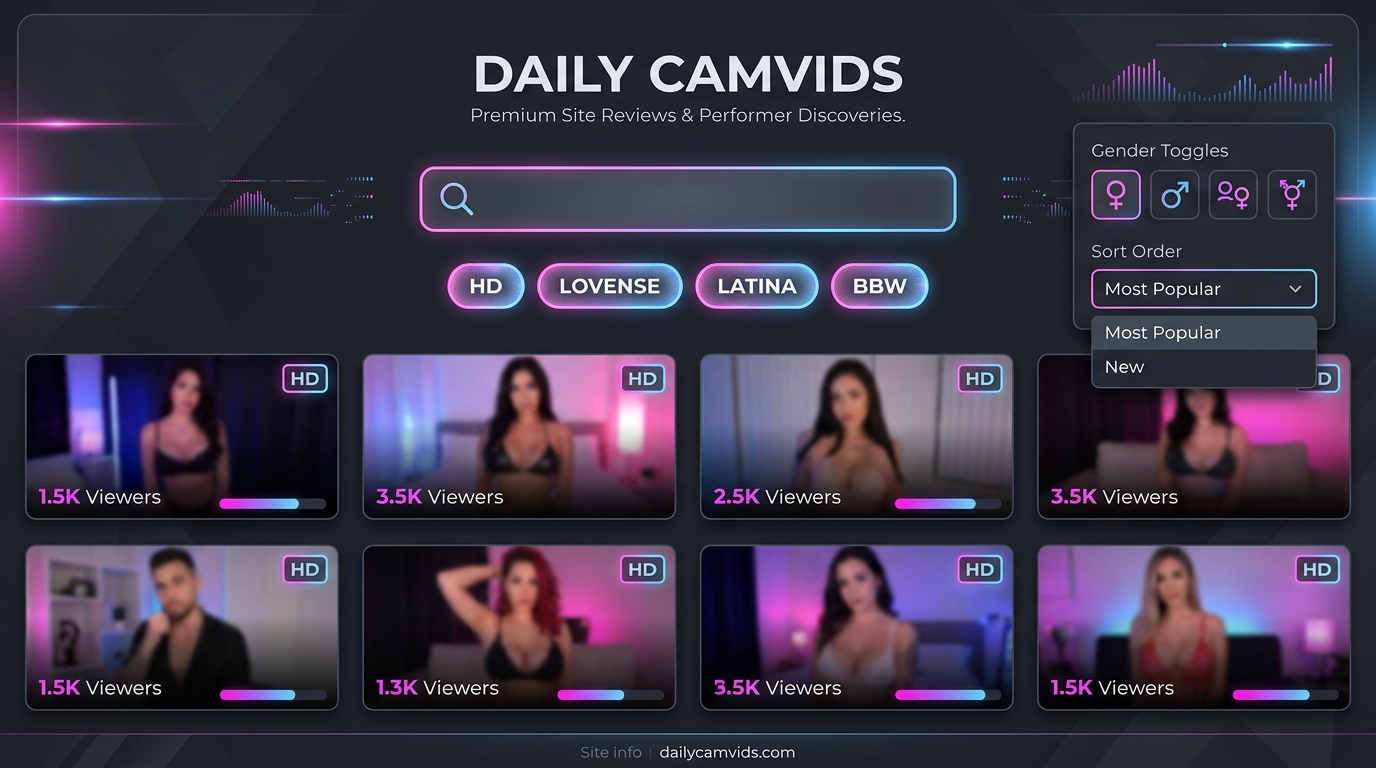
The first filter on any cam platform is gender or performer type:
- Female: Solo female performers (the largest category on most platforms)
- Male: Solo male performers
- Trans/Transsexual: Trans performers (terminology varies by platform)
- Couples/Pair: Two performers broadcasting together
- Groups: Three or more performers
Always start with the gender filter before any other filtering — it immediately narrows the pool by 50-80% depending on your preference. See cam categories explained for a full breakdown of category types.
Step 2: Tag Filtering
Tags describe content type, performance style, body type, and show features. Effective tag use:
Chaturbate Tags
Chaturbate has the most robust tag system. Tags are self-applied by performers and include hundreds of specific descriptors. To use tags:
- Click the gender category (e.g., Female)
- In the tag search bar (top of the page), type a tag
- Click the tag to filter to performers using it
- Combine with other filters using the tag system
Useful Chaturbate tags: "hd" (HD streams), "lovense" (interactive toys), "new" (new performers), "goal" (active goal shows), "squirt" (specific content), "latina", "asian", "ebony" (demographic tags), "bbw", "fit", "petite" (body type tags).
Stripchat Filters
Stripchat's filter system is more structured than Chaturbate's — built into the interface rather than tag-based:
- HD Only: Button on the main page — the most useful filter for quality viewers
- Interactive Toy: Filter to performers with active connected devices
- VR: Filter to VR-capable shows
- New Models: Filter to recently joined performers
- Region: Filter by performer location (Latin America, Europe, etc.)
Stripchat's integrated filters are more reliable than self-reported tags. See Stripchat review.
BongaCams Filters
BongaCams offers category filtering and tag searching similar to Chaturbate. The country/region filter is particularly useful on BongaCams given its European performer concentration — filtering to specific countries is effective here. See BongaCams review.
Step 3: Sort Order Matters
After applying filters, sort order determines what you see first:
- Most Popular / Most Viewers: Shows the highest-viewership rooms. Best for finding active goal shows with engaged chats.
- New: Shows recently started broadcasts. Good for finding shows before they get crowded.
- Featured: Platform-promoted rooms (often involves performer fees or algorithmic promotion).
- HD: On some platforms, sort by HD quality only.
"Most Popular" is the best starting sort for new viewers — it surfaces the most active, highest-quality shows. Switch to "New" when Popular shows don't match your preferences.
Step 4: Searching by Performer Name
If you know a specific performer's username:
- Use the platform's search bar to search directly by name
- Most platforms have a dedicated search field for performer names
- Note that performers may broadcast on multiple platforms under the same username
Following performers (see how to follow performers on cam sites) is more efficient than searching by name repeatedly — you get notified when they go live.
Advanced Filtering Tips
- Combine filters: Gender + tag + sort = very specific results. Start broad and narrow down.
- Thumbnail hover: On most platforms, hovering over a thumbnail shows a live preview before entering. Use this to evaluate shows without committing.
- Goal bar: Look at the goal progress bar on thumbnails — rooms near goal completion are often about to become more active.
- Viewer count: Visible on thumbnails. High viewer count = active show; very low count = often low energy.
- HD badge: Many platforms show HD/FHD/4K badges on thumbnails — use these to filter without entering each room.
Conclusion
Efficient cam site navigation comes down to three steps: gender filter → tag or feature filter → sort by relevance. Stripchat has the cleanest built-in filter system; Chaturbate has the most powerful tag ecosystem. For beginners, see best cam sites for beginners and do you need an account to watch cam sites.
React to this article
Comments
Loading…
Leave a comment
Loading…